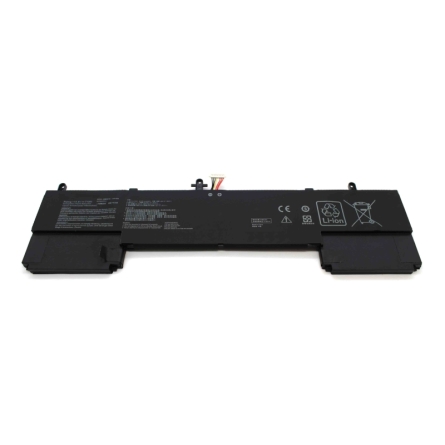
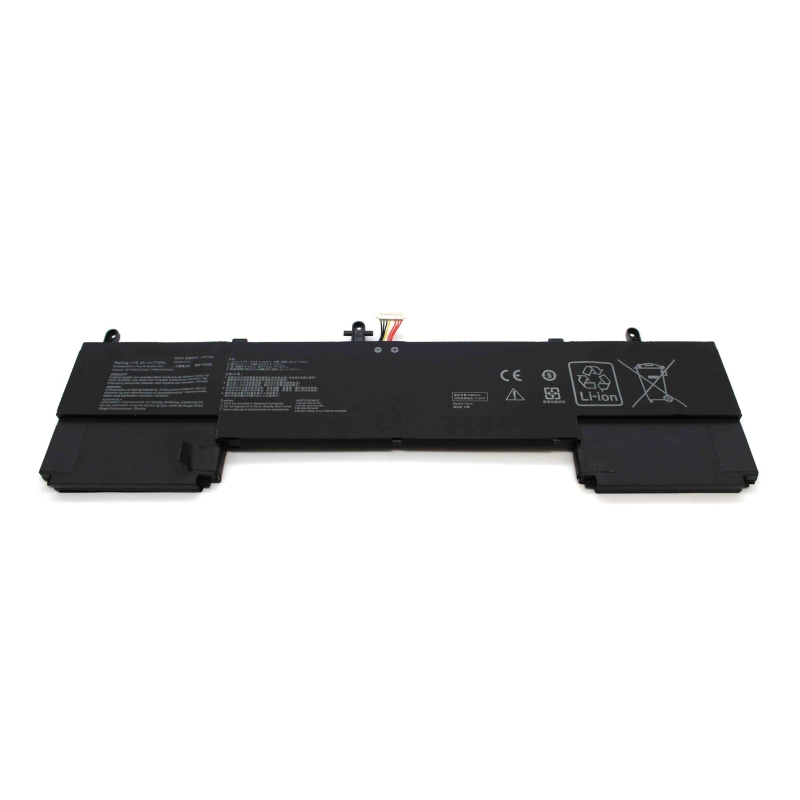
Laptop-Akku für ASUS ZENBOOK 15 UX534 UX563FD C42N1839
Laptop-Akku Asus
Modelle: ZenBook 15 UX534, UX534F, UX534FT, UX534FTC, UX534FA, UX534FAC, UX534FT, UX534FTC, UX563, UX563FD
P/N: C42N1839, 0B200-03470000
Hochwertige kompatible Laptop-Akkus
Diese kompatiblen Laptop-Akkus sind so konzipiert, dass sie die gleiche Leistung wie der Original-Akku bieten und gleichzeitig Autonomie, Stabilität und Sicherheit im täglichen Gebrauch gewährleisten.
Es handelt sich nicht um Originalakkus des Laptop-Herstellers, sondern um kompatible Akkus, die nach anspruchsvollen technischen Standards entwickelt wurden. Dadurch können wir ein hervorragendes Preis-Leistungs-Verhältnis anbieten, ohne die Funktionsfähigkeit des Geräts zu beeinträchtigen.
Warum sich für einen hochwertigen kompatiblen Akku entscheiden?
Ein gut konzipierter kompatibler Akku senkt nicht nur die Kosten, sondern kann auch eine absolut zuverlässige Leistung bieten, wenn er die entsprechenden Parameter erfüllt.
Diese Akkus werden unter Qualitätskontrollprozessen hergestellt. Zertifiziert nach den Normen ISO 9001 und ISO 14001, was einen hohen Anspruch sowohl bei der Herstellung als auch beim Umweltmanagement garantiert.
Bei diesen Batterien wird Priorität auf Folgendes gelegt:
- Echte Kompatibilität mit der Ausrüstung
- Stabilität beim Laden und Entladen
- Integrierte elektronische Schutzvorrichtungen
- Optimierte Nutzungsdauer
Dies ermöglicht ein sicheres Erlebnis und effiziente Nutzung, vergleichbar mit dem Original-Akku unter normalen Nutzungsbedingungen.
Was Sie vor dem Kauf überprüfen sollten
Um sicherzustellen, dass Sie den richtigen Akku auswählen, ist es wichtig, die folgenden Daten zu überprüfen:
- Original-Akku-Referenz
- Genaues Modell des Laptops
- Spannung (V) und Kapazität (mAh oder Wh)
- Form und Art des Steckers
In jedem Produktblatt finden Sie eine Liste kompatibler Modelle und gleichwertiger Referenzen, um die Identifizierung zu erleichtern.
MERKMALE
Spezifikationen
| Spannung: | 15.20 V |
| Kapazität: | 52 Wh |
Kompatible Modelle
- Asus ZenBook 15 UX533FAC
- Asus ZenBook 15 UX533FAC-A8158T
- Asus ZenBook 15 UX534
- Asus ZenBook 15 UX534FA-A8038R
- Asus ZenBook 15 UX534FA-A8085T
- Asus ZenBook 15 UX534FAC
- Asus ZenBook 15 UX534FAC-A8072T
- Asus ZenBook 15 UX534FAC-A8083T
- Asus ZenBook 15 UX534FAC-A8176T
- Asus ZenBook 15 UX534FT-A8078R
- Asus ZenBook 15 UX534FT-A9009R
- Asus ZenBook 15 UX534FT-A9012T
- Asus ZenBook 15 UX534FT-AA025T
- Asus ZenBook 15 UX534FTC
- Asus ZenBook 15 UX534FTC-A8210T
- Asus ZenBook 15 UX534FTC-A8361T
- Asus ZenBook Flip 15 UX563FD
- Asus ZenBook Flip 15 UX563FD-A1015T
- Asus ZenBook Flip 15 UX563FD-A1025R
- Asus ZenBook Flip 15 UX563FD-A1044T
- Asus ZenBook Flip 15 UX563FD-EZ056T
- Asus ZenBook Flip 15 UX563FD-EZ057T
- Asus ZenBook Flip Q537FD
- Asus ZenBook Flip Q547FD
- Asus ZenBook Flip Q547FD-BI7T9
- ASUS ZenBook 15 UX534
- ASUS ASUS ZenBook 15 UX534F 15 UX563FD
- ASUS ZenBook 15 UX533
- ASUS ZenBook 15 UX533FAC
- ASUS ZenBook 15 UX533FTC
- ASUS ZenBook 3FD
- ASUS ZenBook Q5-Serie
- ASUS ZenBook 37FD
- ASUS ZenBook Q547FD
- ASUS ZenBook Q546F
- ASUS ZenBook Q546FD
- ASUS ZenBook UX534FT-Serie
- ASUS ZenBook UX534FT-0043B8565U
- ASUS ZenBook UX534FT-78D15AB
- ASUS ZenBook UX534FT-A7601T
- ASUS ZenBook UX534FT-A7621TS
- ASUS ZenBook UX534FT-A9002T
- ASUS ZenBook UX534FT-A9004T
- ASUS ZenBook UX534FT-A9011T
- ASUS ZenBook UX534FT-A9012TS
- ASUS ZenBook UX534FT-A9023T
- ASUS ZenBook UX534FT-AA024R
- ASUS ZenBook UX534FT-AA025R
- ASUS ZenBook UX534FT-AA025T
- ASUS ZenBook UX534FT-AA028T
- ASUS ZenBook UX534FT-AA028R
- ASUS ZenBook UX534FT-AA318T
- ASUS ZenBook UX534FT-BP8509T
- ASUS ZenBook UX534FT-DB77
- ASUS ZenBook UX534FTC-Serie
- ASUS ZenBook UX534FTC-AA052T
- ASUS ZenBook UX534FTC-BP1517U
- ASUS ZenBook 15 UX534FA-Serie
- ASUS ZenBook 15 UX534FA-A8038R
- ASUS ZenBook 15 UX534FA-A8038T
- ASUS ZenBook 15 UX534FA-A8061T
- ASUS ZenBook 15UX534FA-A8077T
- ASUS ZenBook 15 UX534FA-A8085R
- ASUS ZenBook 15 UX534FA-A8085T
- ASUS ZenBook 15 UX534FA-A8094T
- ASUS ZenBook 15 UX534FA-A8179T
- ASUS ZenBook 15 UX534FA-A8187T
- ASUS ZenBook 15 UX534FA-A8194R
- ASUS ZenBook 15 UX534FA-A9006R
- ASUS ZenBook 15 UX534FA-A9007T
- ASUS ZenBook 15 UX534FA-A9014T
- ASUS ZenBook 15 UX534FA-A9020R
- ASUS ZenBook 15 UX534FA-AA008T
- ASUS ZenBook 15 UX534FA-AA025R
- ASUS ZenBook 15 UX534FAC-Serie
- ASUS ZenBook 15 UX534FAC-A8047T
- ASUS ZenBook 15 UX534FAC-A8048R
- ASUS ZenBook 15 UX534FAC-A8048T
- ASUS ZenBook 15 UX534FAC-A8053T
- ASUS ZenBook 15 UX534FAC-A8054T
- ASUS ZenBook 15 UX534FAC-A8072T
- ASUS ZenBook 15 UX534FAC-A8080R
- ASUS ZenBook 15 UX534FAC-A8083T
- ASUS ZenBook 15 UX534FAC-A8085R
- ASUS ZenBook 15 UX534FAC-A8169T
- ASUS ZenBook 15 UX534FAC-A8176T
- ASUS ZenBook 15 UX534FAC-A9084T
- ASUS ZenBook 15 UX534FAC-A9121R
- ASUS ZenBook 15 UX534FAC-A9121T
- ASUS ZenBook 15 UX534FAC-AA060R
- ASUS ZenBook 15 UX534FAC-AA060T
- ASUS ZenBook 15 UX534FAC-AA192T
- ASUS ZenBook 15 UX534FAC-AA196T
- ASUS ZenBook 15 UX534FAC-AA205T
- ASUS ZenBook 15 UX534FT-Serie
- ASUS ZenBook 15 UX534FT-0043B8565U
- ASUS ZenBook 15 UX534FT-78D15AB1
- ASUS ZenBook 15 UX534FT-A7622TS
- ASUS ZenBook 15 UX534FT-A8078R
- ASUS ZenBook 15 UX534FT-A8104T
- ASUS ZenBook 15 UX534FT-A8145T
- ASUS ZenBook 15 UX534FT-A8194T
- ASUS ZenBook 15 UX534FT-A9002T
- ASUS ZenBook 15 UX534FT-A9004T
- ASUS ZenBook 15 UX534FT-A9009R
- ASUS ZenBook 15 UX534FT-A9009T
- ASUS ZenBook 15 UX534FT-A9012T
- ASUS ZenBook 15 UX534FT-A9014T
- ASUS ZenBook 15 UX534FT-A9012TS
- ASUS ZenBook 15 UX534FT-A9023R
- ASUS ZenBook 15 UX534FT-A9032T
- ASUS ZenBook 15 UX534FT-A9038T
- ASUS ZenBook 15 UX534FT-A9142T
- ASUS ZenBook 15 UX534FT-A9143T
- ASUS ZenBook 15 UX534FT-A9175T
- ASUS ZenBook 15 UX534FT-AA024R
- ASUS ZenBook 15 UX534FT-AA025R
- ASUS ZenBook 15 UX534FT-AA025T
- ASUS ZenBook 15 UX534FT-AA028T
- ASUS ZenBook 15 UX534FT-AA044R
- ASUS ZenBook 15 UX534FT-AA052T
- ASUS ZenBook 15 UX534FT-BP8509T
- ASUS ZenBook 15 UX534FT-DB77
- ASUS ZenBook 15 UX534FTC-Serie
- ASUS ZenBook 15 UX534FTC-A702T
- ASUS ZenBook 15 UX534FTC-A7611T
- ASUS ZenBook 15 UX534FTC-A8068T
- ASUS ZenBook 15 UX534FTC-A8078R
- ASUS ZenBook 15 UX534FTC-A8094T
- ASUS ZenBook 15 UX534FTC-A8096T
- ASUS ZenBook 15 UX534FTC-A8103T
- ASUS ZenBook 15 UX534FTC-A8110T
- ASUS ZenBook 15 UX534FTC-A8115T
- ASUS ZenBook 15 UX534FTC-A8116T
- ASUS ZenBook 15 UX534FTC-A8121R
- ASUS ZenBook 15 UX534FTC-A8121T
- ASUS ZenBook 15 UX534FTC-A8122T
- ASUS ZenBook 15 UX534FTC-A8125T
- ASUS ZenBook 15 UX534FTC-A8132T
- ASUS ZenBook 15 UX534FTC-A8145T
- ASUS ZenBook 15 UX534FTC-A8184R
- ASUS ZenBook 15 UX534FTC-A8184T
- ASUS ZenBook 15 UX534FTC-A8186R
- ASUS ZenBook 15 UX534FTC-A8190T
- ASUS ZenBook 15 UX534FTC-A8197T
- ASUS ZenBook 15 UX534FTC-A8210T
- ASUS ZenBook 15 UX534FTC-A8211T
- ASUS ZenBook 15 UX534FTC-A8312T
- ASUS ZenBook 15 UX534FTC-A8358T
- ASUS ZenBook 15 UX534FTC-A8361T
- ASUS ZenBook 15 UX534FTC-A9073TS
- ASUS ZenBook 15 UX534FTC-A9320TS
- ASUS ZenBook 15 UX534FTC-A9337TS
- ASUS ZenBook 15 UX534FTC-A9338TS
- ASUS ZenBook 15 UX534FTC-AA052T
- ASUS ZenBook 15 UX534FTC-AA064R
- ASUS ZenBook 15 UX534FTC-AA083T
- ASUS ZenBook 15 UX534FTC-AA092R
- ASUS ZenBook 15 UX534FTC-AA120R
- ASUS ZenBook 15 UX534FTC-AA170T
- ASUS ZenBook 15 UX534FTC-AA249T
- ASUS ZenBook 15 UX534FTC-AA305T
- ASUS ZenBook 15 UX534FTC-AA329T
- ASUS ZenBook 15 UX534FTC-AA330R
- ASUS ZenBook 15 UX534FTC-AA346T
- ASUS ZenBook 15 UX534FTC-AS77
- ASUS ZenBook 15 UX534FTC-BH74
- ASUS ZenBook 15 UX534FTC-BP1517U
- ASUS ZenBook 15 UX534FTC-BPC1516T
- ASUS ZenBook 15 UX534FTC-PURE15
- ASUS ZenBook 15 UX534FTC-PURE2
- ASUS ZenBook 15 UX534FTC-PURE3
- ASUS ZenBook 15 UX534FTC-WB701R
- ASUS ZenBook 15 UX534FTC-XH77
- ASUS ZenBook Flip 15 UX563
- ASUS ZenBook Flip 15 UX563FD-Serie
- ASUS ZenBook Flip 15 UX563FD-70A05CP1
- ASUS ZenBook Flip 15 UX563FD-A1015R
- ASUS ZenBook Flip 15 UX563FD-A1015T
- ASUS ZenBook Flip 15 UX563FD-A1025R
- ASUS ZenBook Flip 15 UX563FD-A1027T
- ASUSZenBook Flip 15 UX563FD-A1027R
- ASUS ZenBook Flip 15 UX563FD-A1041T
- ASUS ZenBook Flip 15 UX563FD-A1044T
- ASUS ZenBook Flip 15 UX563FD-A1045T
- ASUS ZenBook Flip 15 UX563FD-A1053R
- ASUS ZenBook Flip 15 UX563FD-A1072R
- ASUS ZenBook Flip 15 UX563FD-A1080R
- ASUS ZenBook Flip 15 UX563FD-A1080T
- ASUS ZenBook Flip 15 UX563FD-EZ008T
- ASUS ZenBook Flip 15 UX563FD-EZ012T
- ASUS ZenBook Flip 15 UX563FD-EZ020T
- ASUS ZenBook Flip 15 UX563FD-EZ034R
- ASUS ZenBook Flip 15 UX563FD-EZ043T
- ASUS ZenBook Flip 15 UX563FD-EZ050T
- ASUS ZenBook Flip 15 UX563FD-EZ056T
- ASUS ZenBook Flip 15 UX563FD-EZ057T
- ASUS ZenBook Flip 15 UX563FD-EZ067T
- ASUS ZenBook Flip 15 UX563FD-EZ082T
- ASUS ZenBook Flip 15 UX563FD-EZ087T
- ASUS ZenBook Flip 15 UX563FD-EZ097R
- ASUS ZenBook Flip 15 UX563FD-WB701R
- ASUS Zenbook Flip Q537FD-Serie
- ASUS Zenbook Flip Q537FD-BI7T7
- ASUS Zenbook Flip Q547FD-Serie
- ASUS Zenbook Flip Q547FD-BI7T9
- ASUS ZenBook 15 UX533-Serie
- ASUS ZenBook 15 UX533FAC-Serie
- ASUS ZenBook 15 UX533FAC-A8097T
- ASUS UX533FAC-A8107T
- ASUS UX533FAC-A8158T
- ASUS ZenBook 15 UX533FTC-Serie
- ASUS ZenBook 15 UX533FTC-A8176T
- ASUS UX533FTC-A8211T
- ASUS ZenBook 15 UX533FD-A8067T
- ASUS ZenBook 15 Q546F
- ASUS Q546FD
- ASUS Q546FD-BI7T14
Kompatible Seriennummern
Achtung
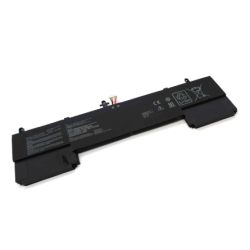
Bitte stellen Sie vor dem Kauf sicher, dass der von Ihnen benötigte Akku der von uns beworbene ist. Um Fehler und Rücksendungen zu vermeiden, vergleichen Sie den Akku Ihres Laptops mit dem auf den Fotos gezeigten. In einigen Fällen stimmen sie möglicherweise mit der P/N-Nummer überein, nicht aber physisch.
Dieser Laptop-Akku ist mit den angegebenen Modellen (und mehr) kompatibel. Darunter sehen Sie das komplette Modell Ihres Laptops. Wenn Sie das Modell Ihres Laptops nicht finden oder nicht wissen, welcher Akku kompatibel ist, fragen Sie bitte nach, wir informieren Sie gerne.
Elektronischer Schutz
| Gegen Tiefentladung | Automatische Abschaltung zum Schutz der Zellen. |
| Thermischer Schutz | Temperaturüberwachung und -abschaltung. |
| Gegen Kurzschlüsse | Sofortige Sicherheitsreaktion. |
| Ladetemperaturkontrolle | Stabiles und sicheres Laden. |
| RoHS | Beschränkung gefährlicher Stoffe Substanzen |
Ihr Modell ist nicht aufgeführt?
Es ist möglich, dass Ihr Laptop mit diesem Akku kompatibel ist, auch wenn er nicht explizit in der Liste aufgeführt ist. Dies kann auftreten, weil einige Hersteller den gleichen Akku in verschiedenen Modellen oder Varianten verwenden.
In diesem Fall wird empfohlen, Folgendes zu überprüfen:
- Die Referenz des Originalakkus stimmt mit einer der angegebenen überein
- Die Spannung ist genau gleich (kritische Daten)
- Der Stecker und die Form sind identisch
- Die Abmessungen sind mit dem Laptop-Gehäuse kompatibel
Wenn diese Punkte übereinstimmen, ist es sehr wahrscheinlich Es ist wahrscheinlich, dass der Akku mit dem Gerät kompatibel ist, auch wenn das Modell nicht aufgeführt ist.
Im Zweifelsfall empfiehlt es sich, die Kompatibilität vor dem Kauf zu überprüfen, um Fehler zu vermeiden.
Echte Vorteile beim Austausch des Akkus
- Erhält die Autonomie zurück
Ermöglicht die erneute Verwendung des Laptops, ohne ständig auf das Ladegerät angewiesen zu sein. - Stabiler Betrieb
Vermeiden schaltet unerwartete Ereignisse ab und verbessert die Geräteleistung. - Längere Lebensdauer
Reduziert die Notwendigkeit häufiger Austausche. - Einfache Installation
In den meisten Fällen erfolgt der Austausch schnell und erfordert keine fortgeschrittenen technischen Kenntnisse.
Kompatibilität: der entscheidende Punkt
Kompatibilität ist der wichtigste Aspekt bei der Auswahl eines Laptop-Akkus. Daher finden Sie in diesem Blatt alle kompatiblen Referenzen und gleichwertigen Modelle, die mit diesem Produkt in Verbindung stehen.
Die richtige Auswahl garantiert einen ordnungsgemäßen Betrieb und vermeidet Probleme bei der Installation oder Verwendung.
Empfehlungen für den Austausch des Akkus
Der Austausch des Akkus eines Laptops ist in den meisten Fällen ein einfacher Vorgang, aber es ist wichtig, eine Reihe von Empfehlungen zu befolgen, um eine korrekte und sichere Installation zu gewährleisten.
Vorher Installation
- Schalten Sie den Laptop vollständig aus (nicht im Ruhemodus)
- Trennen Sie das Ladegerät und alle Peripheriegeräte
- Arbeiten Sie auf einer sauberen, trockenen und statikfreien Oberfläche
Während des Austauschs
- Behandeln Sie den Akku vorsichtig und vermeiden Sie Stöße oder Verformungen
- Anschlüsse oder Teile dürfen nicht mit Gewalt verwendet werden
- Stellen Sie sicher, dass der Stecker richtig in seiner Position sitzt
- Überprüfen Sie, ob der Akku sicher befestigt ist. sein Gehäuse
Erste Verwendung des Akkus
Um Leistung und Lebensdauer zu optimieren, wird empfohlen, einen vollständigen anfänglichen Ladezyklus durchzuführen:
- Laden Sie den Akku vor dem ersten Gebrauch zu 100 % auf
- Verwenden Sie den Laptop, bis die Ladung auf ca. 10-15 % reduziert ist
- Vollständig aufladen
Dieser Vorgang hilft Kalibrieren Sie das Energieverwaltungssystem des Laptops richtig.
Tipps zur Verlängerung der Nutzungsdauer
- Vermeiden Sie häufige vollständige Entladungen (0 %)
- Lassen Sie den Akku nicht über längere Zeiträume konstant auf 100 % stehen.
- Vermeiden Sie längere Zeit hohe Temperaturen.
- Verwenden Sie immer kompatible Ladegeräte in gutem Zustand
Wichtig
Wenn Sie bei der Installation feststellen, dass der Akku nicht richtig passt oder der Stecker nicht genau passt, sollte die Installation nicht erzwungen werden. In diesem Fall empfiehlt es sich, die Kompatibilität zu prüfen, bevor Sie fortfahren.